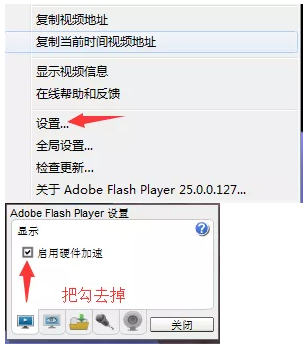
Turn off hardware acceleration, right-click Settings in the video playback window---cancel enabling hardware acceleration;
Turning off hardware acceleration can only solve the problem of online video jams and freezes
If an error occurs, please update FLISH
If the problem persists after setting, please switch to a lower-resolution video source or replace the computer with a higher configuration.



 Home > Support > FAQ

 Telephone:13670170900 Mr. Yang
 Email: hunyipu@163.com


