If you encounter a situation where your laptop cannot be turned on (does not turn on/cannot be turned on), please compare the following phenomena and solutions:
The key to judging whether it cannot be turned on is the power indicator light
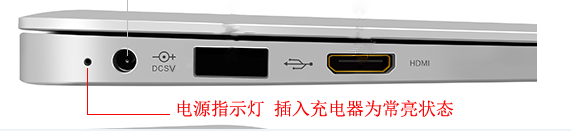
The power indicator is on, refer to the solution
The power indicator is on, which means that the motherboard is over-powered, but it may not be able to boot due to some devices
1. Please remove all external devices, including USB/memory card/network cable/HDMI, etc.
2. Before the problem occurs, have you expanded the hard disk or memory? If so, please restore it to the factory default state first
The power indicator is not on, refer to the solution
It may be that the transformer cannot supply power or the main components are abnormal and cannot boot
Please check the transformer connector, whether the power cord end/socket end/computer end is loose, or try to replace the socket
Please check whether the transformer wire is damaged. If so, please replace the transformer for testing
If your problem is not solved, please contact customer service



 Home > Support > FAQ

 Telephone:13670170900 Mr. Yang
 Email: hunyipu@163.com


